
Jace AI for Accountants: Automate Invoice Emails, Document Requests, and Inbox Triage
Accounting runs on email. Every invoice arrives as an attachment. Every audit request lands in your inbox. Every vendor follow-up, client question, and approval notification competes for attention in the same crowded space.
The average accountant processes 80 to 120 emails per day. During month-end close, audit season, or tax deadlines, that number doubles. Each message requires evaluation: Is this urgent? Does it need a response? Is there an attachment I need to file? Did I already handle this request last week?
This isn't financial work. It's inbox work. And it's consuming hours that should go toward analysis, advisory, and the tasks that require genuine financial expertise.
Jace AI changes how accounting teams handle email. Not by adding another tool to check, but by automating the repetitive triage, drafting, and organization that eats into every workday.

The Accountant's Email Problem
Finance inboxes have a unique structure. Unlike sales or marketing teams, accountants receive emails that follow predictable patterns with high-stakes requirements.
Invoice Processing Volume
A mid-sized accounting firm might receive 50 to 100 vendor invoices per week via email. Each one needs to be opened, verified, logged, and filed. The email itself often requires acknowledgment.
Multiply this across multiple clients or business units, and invoice email alone becomes a part-time job.
Repetitive Document Requests
"Can you send the Q3 reconciliation?" "I need the updated depreciation schedule." "Please forward last year's 1099s."
These requests arrive constantly. The documents exist. The accountant knows where they are. But locating, attaching, and sending them pulls time away from actual accounting work.
Time-Sensitive Follow-ups
Payment reminders need to go out on schedule. Audit document requests have deadlines. Client deliverables require status updates.
Missing a follow-up doesn't just cause inconvenience. It creates compliance risk and damages client relationships.
CC Chains and Approval Workflows
Accountants often sit in the middle of approval chains. You're CC'd on vendor communications, internal approvals, and client threads. Most require no action, but some do.
Distinguishing between the two takes constant attention.
Attachment-Heavy Communication
Almost every meaningful accounting email includes a file: invoices, statements, contracts, reports. Processing email means processing attachments, and that adds friction to every interaction.
The result? Accountants spend two to three hours daily managing email, not doing accounting. That's 10 to 15 hours per week on triage, not analysis.
How Jace AI Solves Accounting Email Challenges
Jace is an AI email agent. Not a chatbot that suggests replies, but an autonomous system that reads, categorizes, and drafts responses based on rules you define.
For accounting workflows, this means automating the repetitive patterns that consume your day.
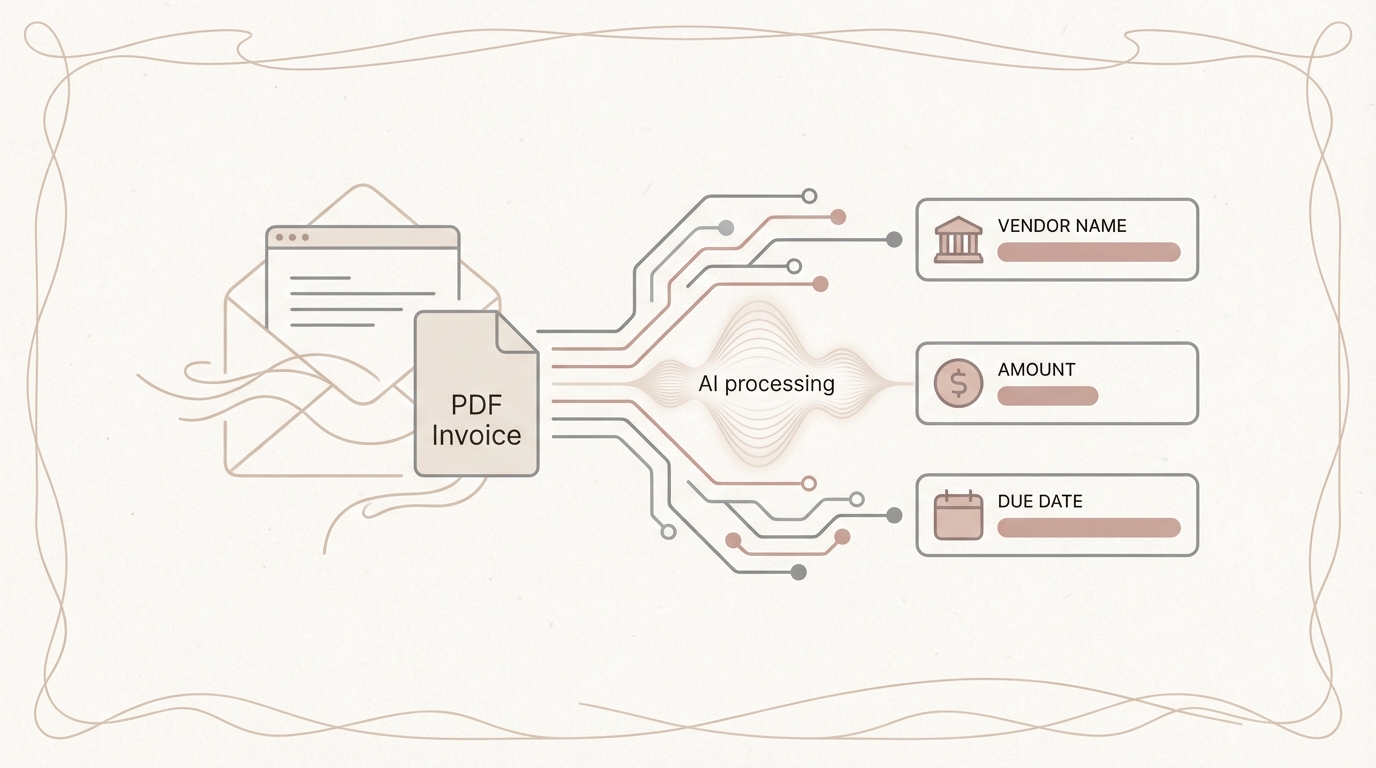
Invoice Email Processing
When an invoice email arrives, Jace reads the full message and any attached PDF. It extracts key details (vendor name, invoice number, amount, due date) and prepares an appropriate response.
You can set rules like:
- "When I receive an invoice from a known vendor, draft an acknowledgment confirming receipt and stating payment will be processed within standard terms."
- "Flag invoices over $10,000 for immediate review and draft a response requesting approval confirmation."
- "If an invoice is missing a PO number, draft a reply requesting the purchase order reference."
Jace doesn't send anything automatically. You review the draft, make any adjustments, and send with one click. The time savings come from not having to read, evaluate, and compose from scratch.
Smart Triage Rules for Finance Emails
Jace categorizes incoming emails using AI labels you define. For accounting teams, useful labels might include:
- Vendor Invoices: Emails containing invoices, statements, or payment requests
- Audit Requests: Document requests related to audits, compliance, or regulatory filings
- Client Deliverables: Emails requiring you to send reports, schedules, or other work product
- Payment Follow-ups: Reminders about outstanding payments or overdue receivables
- Internal Approvals: Approval chains where you're CC'd or need to sign off
- FYI Only: Threads where you're copied for visibility but no action is required
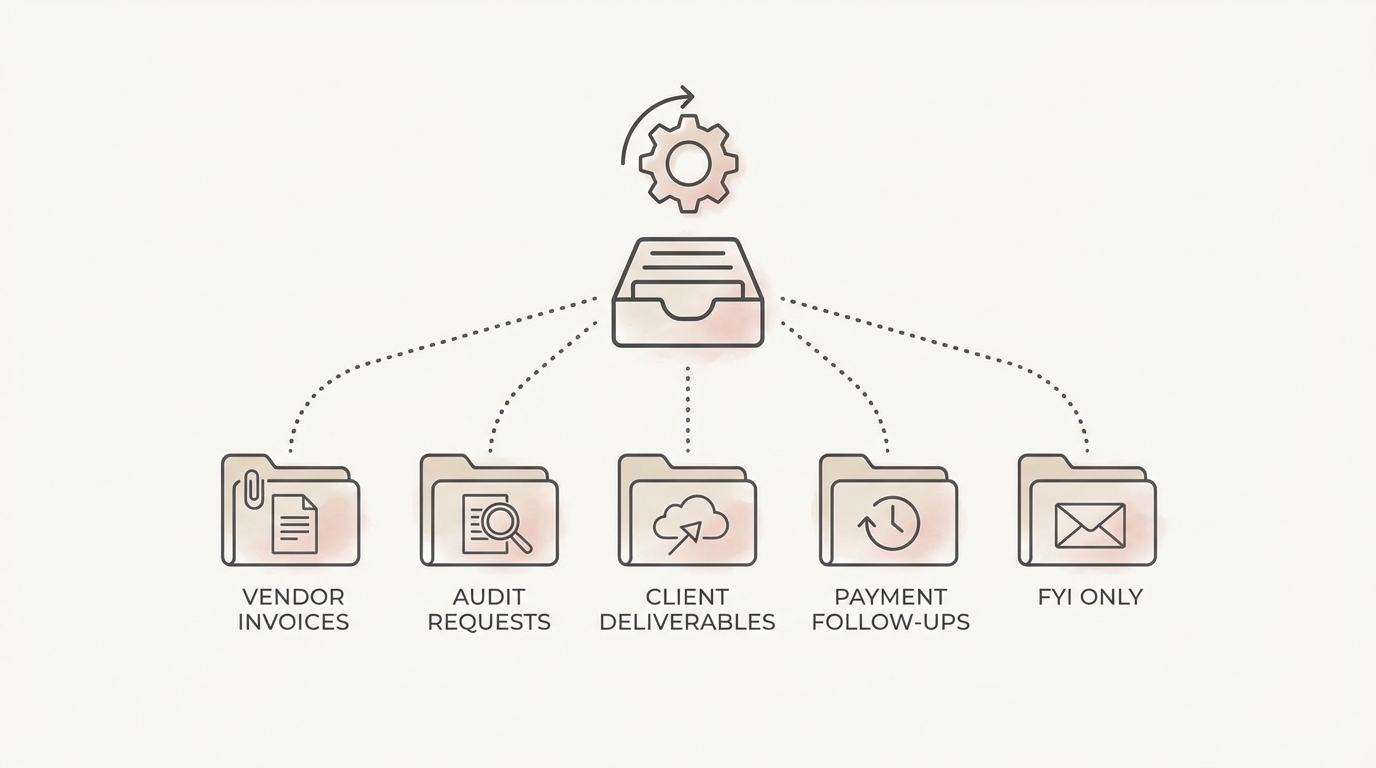
Each email gets tagged automatically when it arrives. You can process "Vendor Invoices" in batches, prioritize "Audit Requests" during busy periods, and safely ignore "FYI Only" until you have time.
Calendar-Aware Drafting
Jace knows your schedule. If someone emails asking for a meeting to discuss quarterly results, Jace can check your availability and draft a response proposing specific times. No more switching between inbox and calendar to coordinate.
For recurring deadlines (month-end close, quarterly filings, annual audits) Jace factors timing into draft suggestions. A request that arrives the week before close gets handled differently than one arriving mid-month.
Attachment Intelligence
When someone requests a document you've previously sent, Jace searches your email history. If you sent the Q3 reconciliation to this same client two months ago, Jace surfaces that context and drafts a reply referencing the original email.
For incoming attachments, Jace reads PDFs and extracts relevant information. Invoice processing doesn't require you to open each PDF manually. Jace parses the key fields and includes them in its draft context.
CC/BCC Logic and Thread Management
Accountants often sit on long email threads where they're CC'd for visibility. Jace distinguishes between:
- Threads where you're the primary recipient (action likely required)
- Threads where you're CC'd but mentioned by name (possible action)
- Threads where you're CC'd with no mention (FYI only)
This categorization happens automatically. You spend less time reading threads that don't require your input.
Compliance-Aware Communication
Financial communication has compliance requirements. Jace learns your standard language for sensitive topics (payment terms, audit responses, confidentiality statements) and incorporates appropriate disclaimers into drafts.
You can create rules like: "Any email discussing client financial data should include our standard confidentiality footer." Jace applies these consistently without you having to remember each time.
Real-World Scenarios: Jace in Accounting Workflows
Scenario 1: Vendor Invoice Processing at Month-End
It's the last week of the month. Your inbox has 47 unread vendor invoices from the past two weeks. Each needs acknowledgment, and several include questions about payment timing.
Without Jace: You open each email individually, review the invoice, draft an acknowledgment, check for issues requiring follow-up, and send. Time: 2 to 3 hours.
With Jace: Invoices are already labeled and grouped. Jace has drafted acknowledgments for straightforward invoices and flagged three with missing PO numbers (drafts requesting the PO are ready). Two invoices exceed your standard approval threshold, and those drafts request manager sign-off. You review the batch, approve 40 drafts with minor edits, and send. Time: 30 minutes.
Scenario 2: Client Audit Document Requests
An external auditor emails requesting 12 specific documents: bank reconciliations, AR aging reports, fixed asset schedules, and several others. Each document exists in your files, but compiling and sending them takes significant time.
Without Jace: You read the request, open your file system, locate each document, attach them to a reply (possibly multiple emails due to size limits), and send with an appropriate cover message. Time: 45 to 60 minutes.
With Jace: Jace identifies this as an audit request and drafts a professional acknowledgment confirming receipt and providing an estimated delivery timeline. It searches your sent emails for similar prior requests to this auditor, surfacing context about their preferred format. You compile the documents (Jace can't access your file system directly), but the draft response is ready with appropriate language. Time: 25 minutes for document compilation, 2 minutes for email.
Scenario 3: Payment Follow-up Sequences
You have 15 clients with outstanding invoices past 30 days. Each needs a follow-up email, but you want to tailor the message based on relationship and payment history.
Without Jace: You review each account, draft individual follow-ups varying in tone from gentle reminder to firm request, and send over the course of an hour. Time: 60 to 90 minutes.
With Jace: You've set rules: "First reminder at 30 days: friendly tone, assume oversight. Second reminder at 45 days: direct, request confirmation of payment date. Third reminder at 60 days: formal, reference terms and next steps." Jace drafts appropriate messages for each client based on aging status. You review, adjust a few for clients with known circumstances, and send. Time: 20 minutes.
Scenario 4: Repetitive Tax Document Requests
During tax season, you receive dozens of emails asking for W-2s, 1099s, and prior year returns. The requests are nearly identical, and so are your responses.
Without Jace: Each email gets individual attention. You verify what they're asking for, locate the documents, draft a response, attach, and send. Time: 5 to 10 minutes per request, 50+ requests per week.
With Jace: Jace recognizes these as tax document requests and drafts responses pointing to your client portal where documents are available, or confirms you'll send within 48 hours. Standard confidentiality language is included automatically. You batch-review and send. Time: 1 to 2 minutes per request.
Benefits for Accounting Teams
Time Savings
Conservative estimates: Jace saves accounting professionals 1.5 to 2 hours daily on email processing. Over a month, that's 30 to 40 hours returned to actual accounting work. During peak periods (month-end, audit season, tax deadlines), the savings compound.
Reduced Errors
Manual email processing invites mistakes. Missed invoices, forgotten follow-ups, wrong attachments. Jace's systematic approach ensures consistency. Every invoice gets acknowledged. Every follow-up goes out on schedule. Every response includes required disclaimers.
Faster Response Times
Clients and vendors notice when you respond quickly. Jace drafts are ready when you open your inbox. What previously took 24 to 48 hours for a routine response now happens same-day, often within hours.
Better Prioritization
Not all emails deserve equal attention. Jace's labeling system ensures urgent items surface immediately while routine correspondence waits for batch processing. You spend mental energy on what matters.
Here's how common accounting tasks compare with and without Jace:
| Task | Manual Processing | With Jace AI |
|---|---|---|
| Acknowledge invoice | Open each email individually | Auto-drafted and grouped by vendor |
| Follow-up overdue payments | Manually track and edit | Rule-based with escalating tone stages |
| Sort audit/document requests | Manually flag or search | Auto-labeled with smart triage |
| Locate past responses/files | Search inbox manually | Auto-suggested from message history |
| Add disclaimers to emails | Paste manually each time | Automatically included per message type |
By automating these patterns, Jace frees up hours weekly for analysis, reconciliation, and advisory work.
Compliance Consistency
Standardized language for sensitive topics protects your firm. Jace applies these standards automatically, reducing risk from inconsistent communication.
Reduced Email Anxiety
Inbox overload creates stress, especially for accountants managing multiple clients and deadlines. When emails are pre-sorted, pre-drafted, and ready for batch processing, the psychological burden decreases significantly.

What Jace Doesn't Do
For clarity on capabilities:
- Jace doesn't send emails automatically. Every draft requires your review and approval before sending. You maintain full control.
- Jace doesn't access your accounting software directly. It works within email. For invoice data to reach your ERP, you still export or enter it.
- Jace doesn't replace professional judgment. Complex client situations, unusual requests, and sensitive matters still require your expertise. Jace handles the routine so you have capacity for the complex.
- Jace doesn't store financial data beyond email. Your email content stays within your email system. Jace processes it for drafting and organization but doesn't create separate data repositories.
Getting Started: Setting Up Jace for Accounting Workflows
Setup takes about 30 minutes:
- Connect your email. Jace works with Gmail and Outlook. Standard OAuth connection, no passwords stored.
- Create accounting-specific labels. Start with: Vendor Invoices, Client Requests, Audit Documents, Payment Follow-ups, FYI Only. Jace uses these to categorize incoming mail automatically.
- Define your rules. Examples for accounting:
- "When I receive an invoice, acknowledge receipt and confirm processing timeline."
- "For document requests from auditors, confirm receipt and provide estimated delivery date."
- "Payment reminders at 30/45/60 days with escalating tone."
- Set your communication standards. Add standard closing language, confidentiality footers, and any required disclaimers.
- Let Jace learn. Over the first week, Jace observes your patterns. It learns your writing style, typical responses, and preferences. Drafts become more accurate with use.
Take Back Your Time
Email isn't going away. Invoices will keep arriving as attachments. Clients will keep requesting documents. Vendors will keep needing acknowledgments. The question is whether you spend professional hours processing these emails manually or automate the repetitive patterns and focus on work that requires actual accounting expertise.
Let Jace manage your inbox, so you can focus on the numbers.
Ready to reclaim 30 to 40 hours per month from email triage? Try Jace free at jace.ai. Setup is quick, the learning curve is minimal, and the time savings start from day one.
